Tip of the Day

Do not go where the path may lead, go instead where there is no path and leave a trail.

Showing posts with label Tutorial. Show all posts

Introduction to Machine Learning: Definition, Types, and Applications

Introduction to Machine Learning: Definition, Types, and Applications


Introduction

Machine learning, a subfield of artificial intelligence (AI), is the driving force behind many modern technologies, from chatbots and predictive text to autonomous vehicles and medical diagnostics. It's a field that enables computers to learn without being explicitly programmed, and it's changing every industry. This article explores the definition, types, and applications of machine learning, providing insights into its potential and limitations.


What is Machine Learning?

Machine learning is defined as the capability of a machine to imitate intelligent human behavior. It's a way to use AI, allowing computers to recognize visual scenes, understand natural language, or perform actions in the physical world. Arthur Samuel, an AI pioneer, defined machine learning in the 1950s as "the field of study that gives computers the ability to learn without explicitly being programmed."


Types of Machine Learning

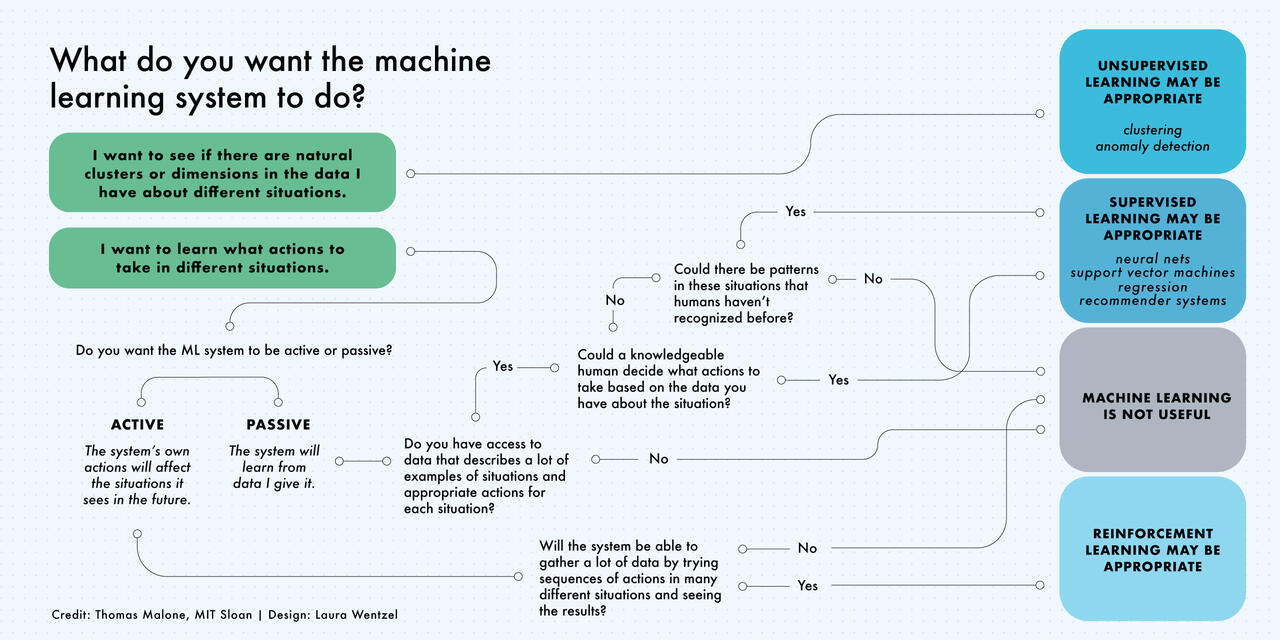
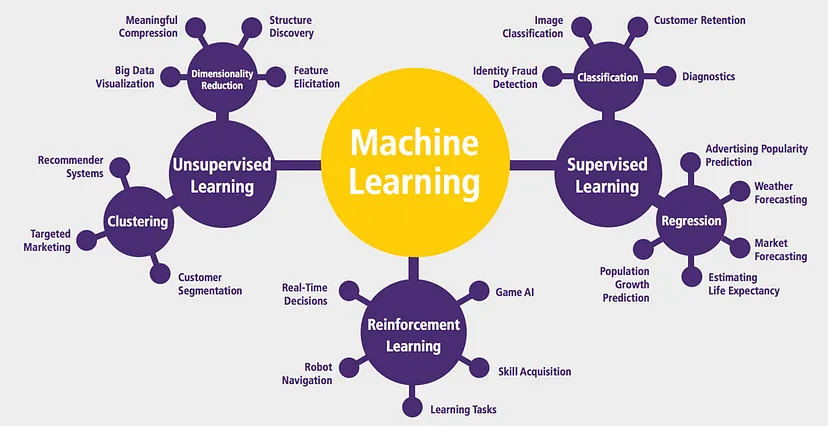
Machine learning can be categorized into three main types:


Supervised Machine Learning

 Models are trained with labeled data sets, allowing them to learn and grow more accurate over time. For example, an algorithm trained with pictures of dogs and other objects can identify pictures of dogs on its own.


Unsupervised Machine Learning

 This type looks for patterns in unlabeled data, finding trends that people aren't explicitly looking for. It can analyze online sales data to identify different types of clients, for example.


Reinforcement Machine Learning

Machines are trained through trial and error using a reward system. It can train models to play games or drive autonomous vehicles by reinforcing correct decisions.

Types of Machine Learning


Applications of Machine Learning

Machine learning has a wide range of applications across various sectors:


Business: From manufacturing to retail, machine learning unlocks new value and boosts efficiency. 67% of companies are using machine learning, according to a recent survey.

Healthcare: Machines can diagnose medical conditions based on images, offering insights that may be beyond human capability.

Environment: Concerns about the economic and environmental sustainability of deep learning, a subset of machine learning, are being addressed to ensure responsible usage.

Entertainment: Platforms like Netflix use machine learning for personalized suggestions, enhancing user experience.


Ethical Considerations

Machine learning also brings social, societal, and ethical implications. It's vital to engage with these tools responsibly, considering how to use them for the good of all. Understanding the potential and limitations of machine learning is essential for leaders across industries.


Conclusion

Machine learning is not just a technological advancement; it's a paradigm shift that's influencing every aspect of our lives. From understanding its basic principles to recognizing its potential and limitations, machine learning is a field that no one can afford to ignore. Its applications are vast, and its impact is profound, shaping the future of work, healthcare, entertainment, and more.

Keras Installation Instructions

Keras Installation Instructions
Keras installation in Anaconda (Windows and Mac )
Before installing keras library, make sure you watch previous video of how to create and activate anaconda environment. Follow below steps to install keras:

  1. Open terminal and activate conda environment using below command
    1. For Windows : activate deeplearning
    2. For MacOS : source activate deeplearning
  2. Once conda environment activated, use below command
    1. conda install keras
  3. Proceed installation by pressing “y”.
  4. Once it gets installed. Open python terminal using keyword “python”
  5. Import keras library.
    1. If you dont get any errors, that means your keras library has been successfully installed.
    2. If you get an error, try installing library again
  6. As keras is using tensorflow backend by default, to change keras backend theano instead follow below procedure:
    1. If you are in windows: go to your userprofile directory > .keras > keras.json
    2. If you are in Mac: go to home directory > .keras > keras.json
  7. Open keras.json file and change the backend “tensorflow” to “theano”
  8. If theano library is not installed, write below command in your deeplearning environment,
    1. conda install theano
  9. Once theano gets successfully installed, validate installation by importing theano in python consol
  10. After validating theano installation, open python terminal again and import keras, this time keras will use theano backend instead tensorflow.

Installing TensorFlow with Anaconda

The Anaconda installation is community supported, not officially supported.
The video installation guide is also available at here.
Take the following steps to install TensorFlow in an Anaconda environment:
Assuming that you have installed one of the python version (Python2.7 or Python 3.X)
First Install Anaconda for your PC.
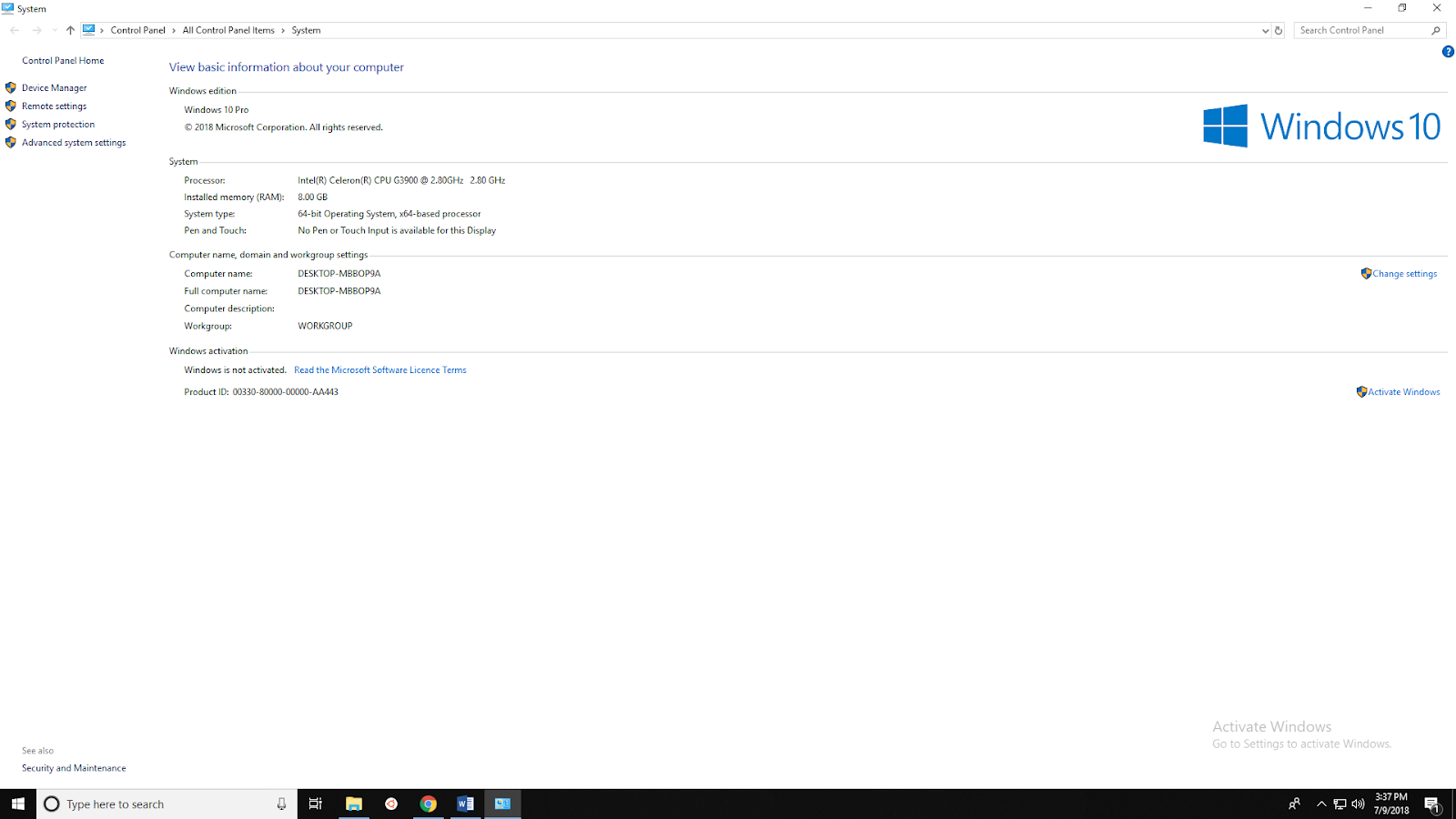
  • There are two version of Anaconda available for your Windows PC. 32bit and 64bit
    • To check what windows version you have, go to > Control Panel\All Control Panel Items\System.
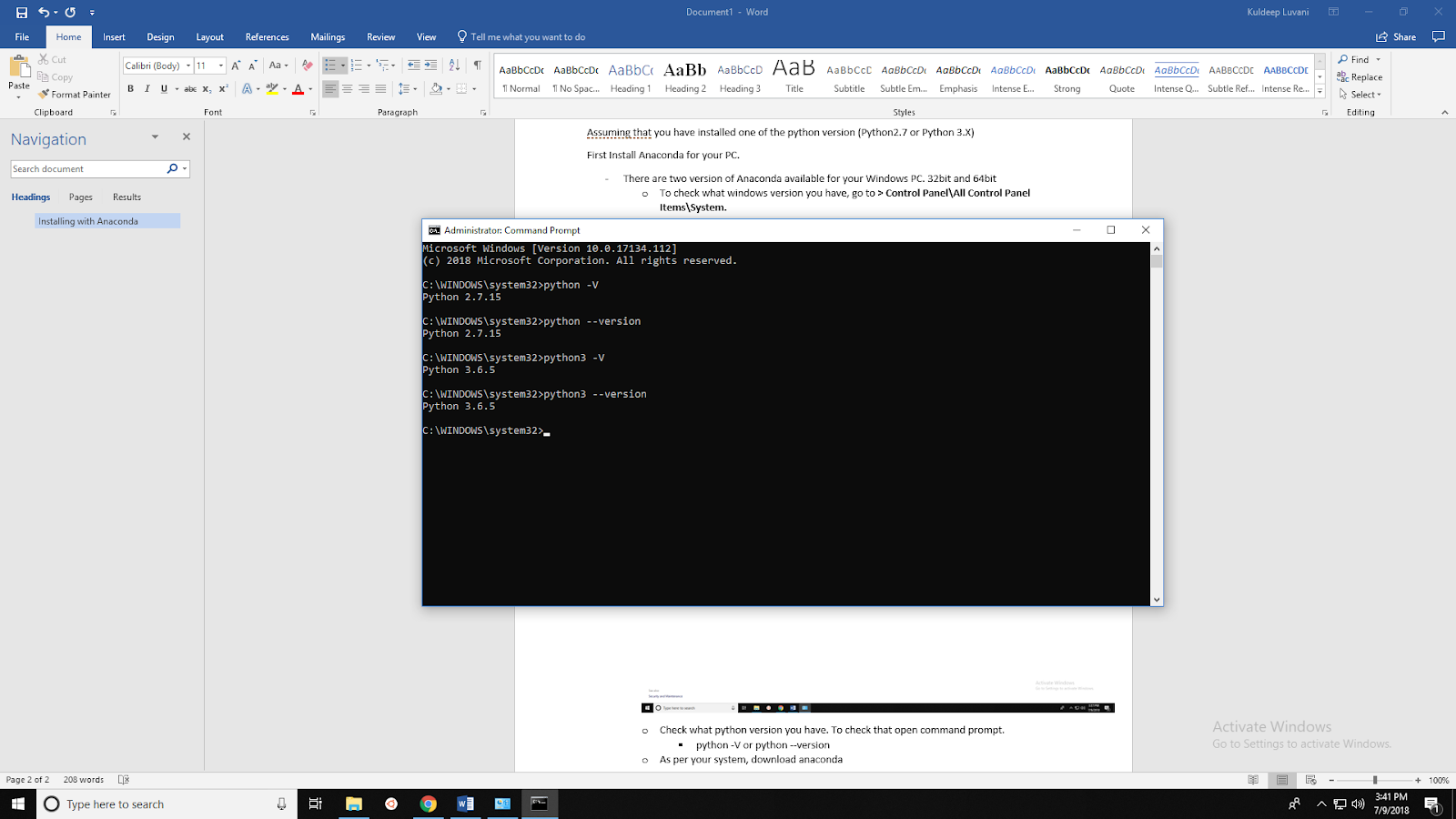
    • Check what python version you have. To check that open command prompt.
      • python -V or python –version

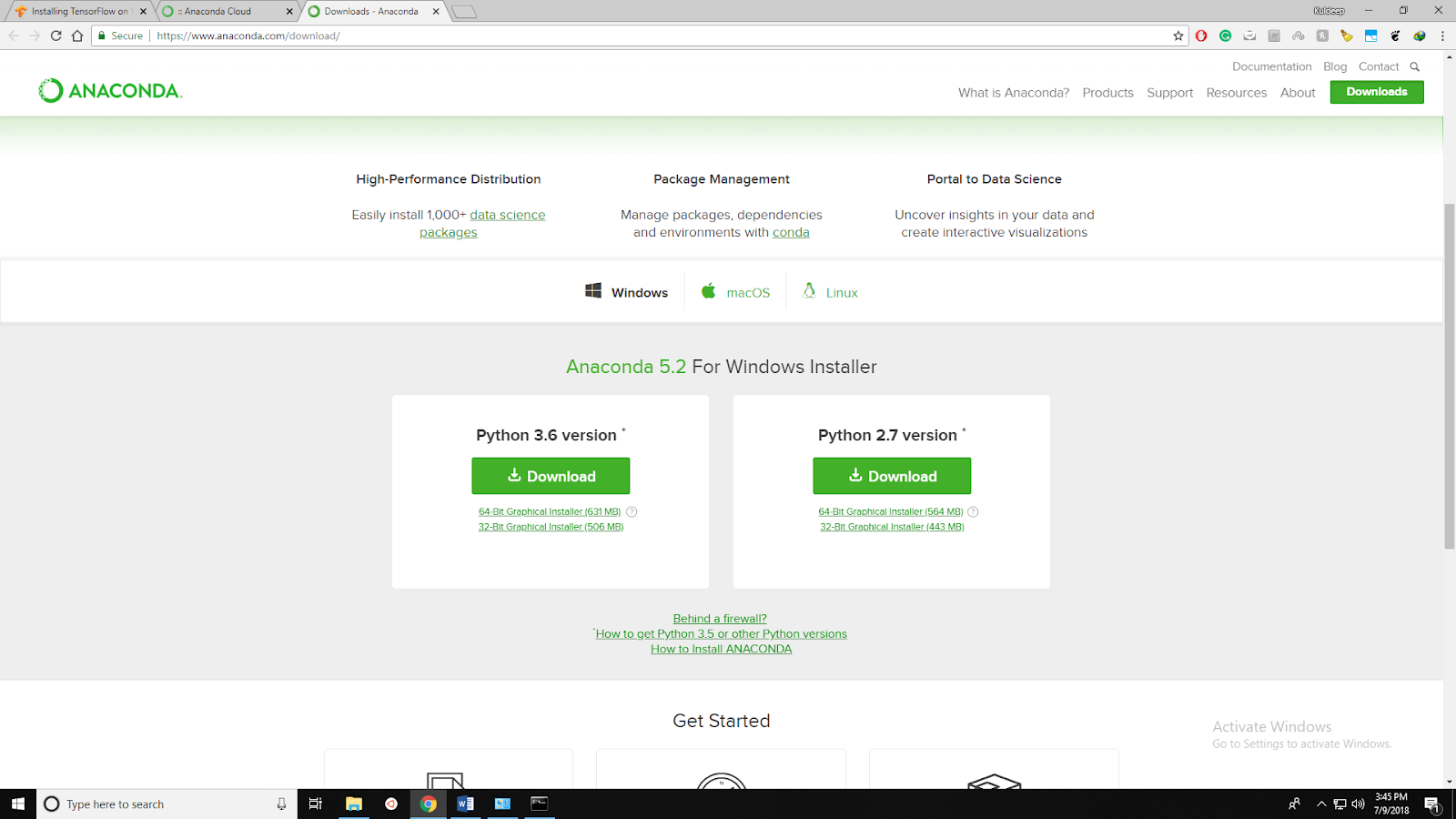
    • Download appropriate Anaconda version from Anaconda website.
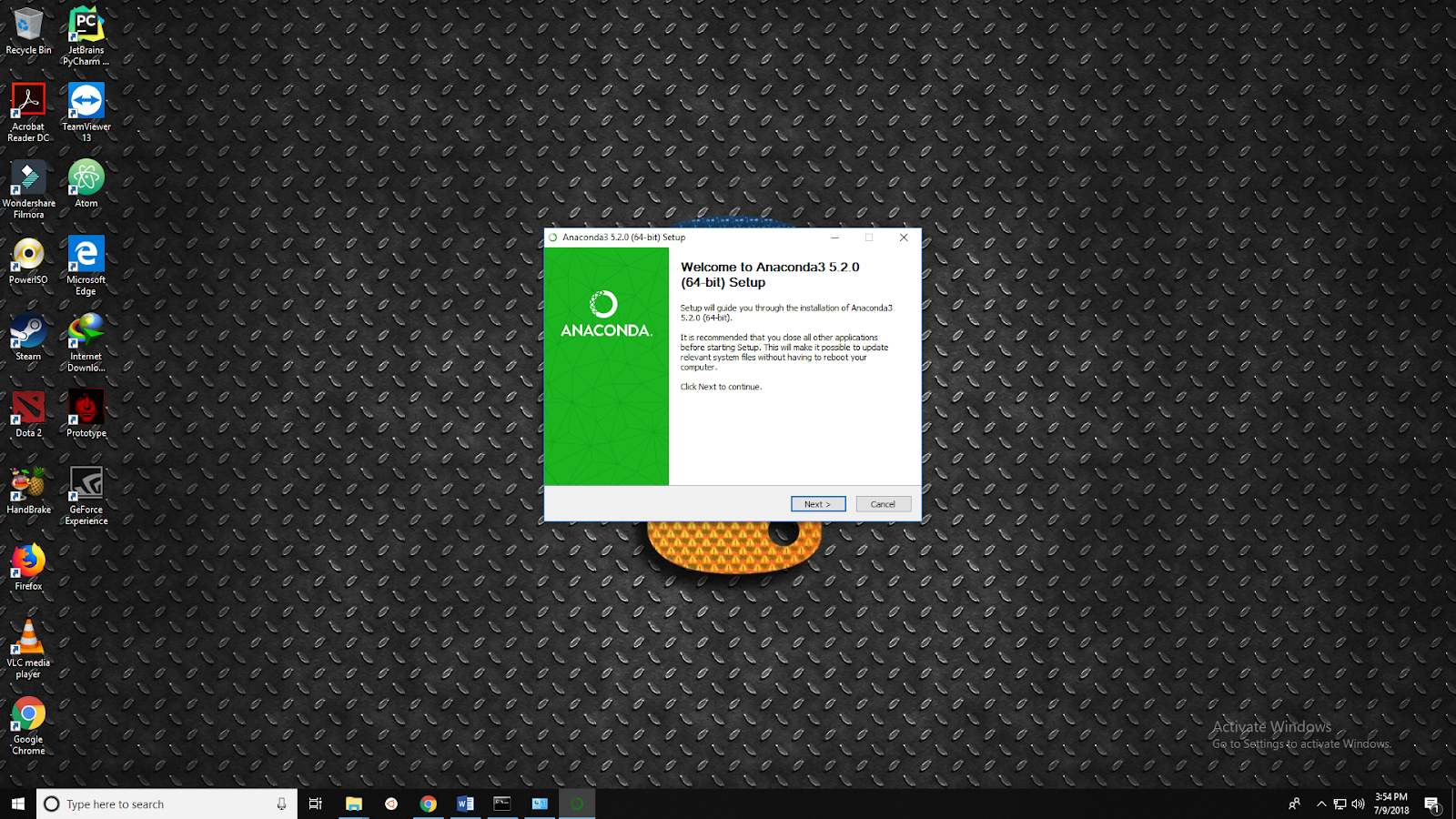
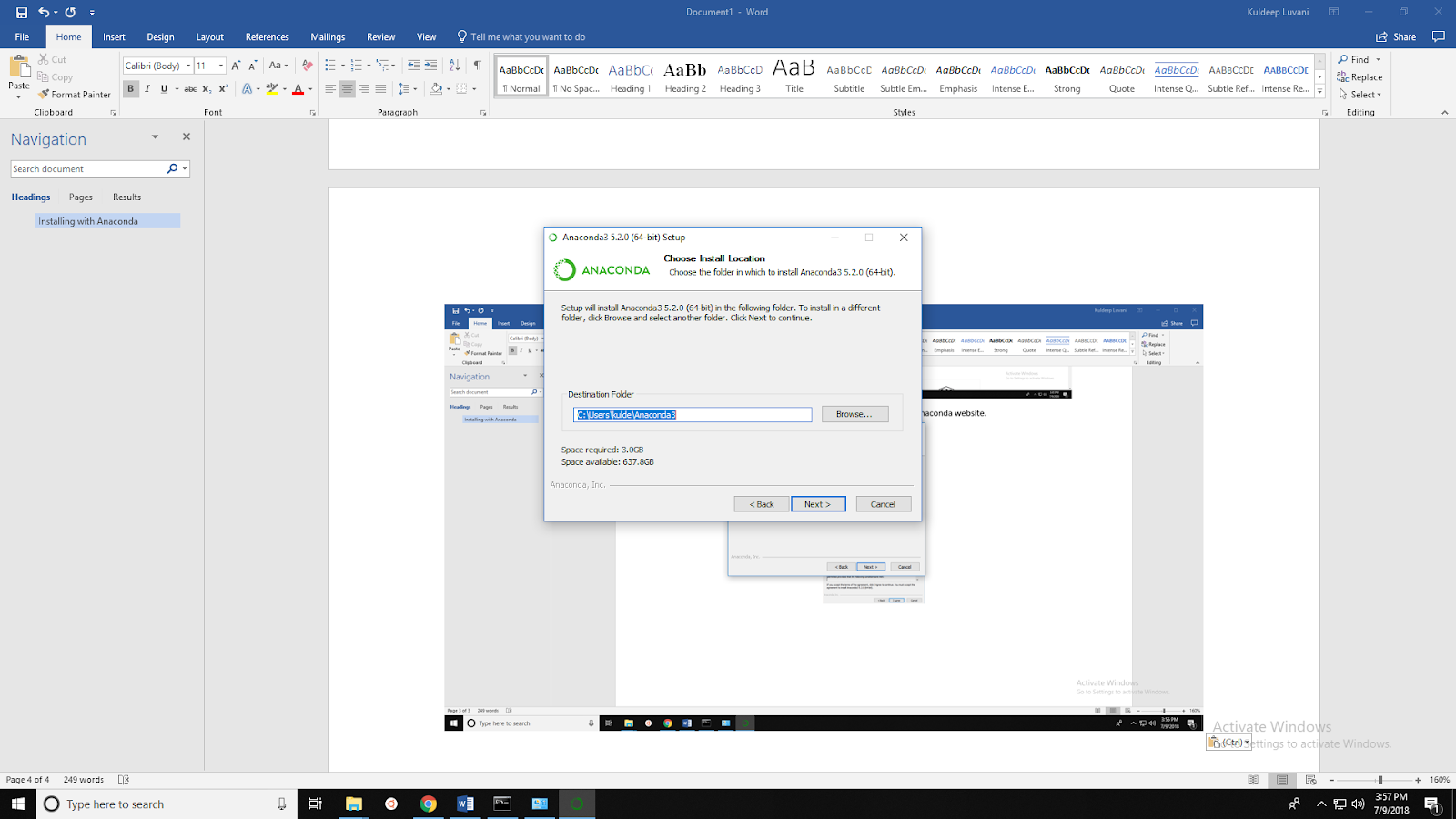
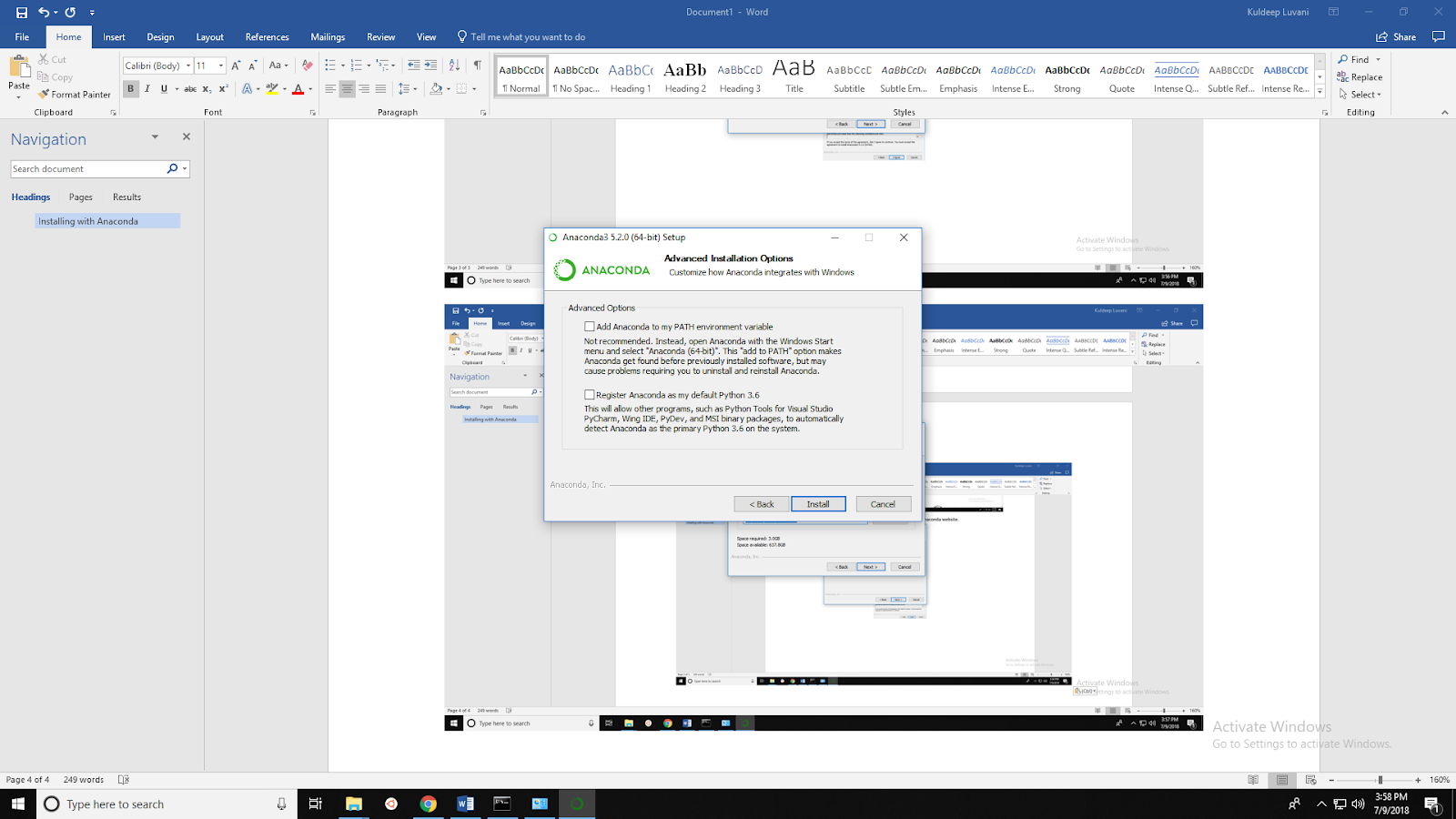
    • Below is installation process of Anaconda:

    • You can check mark on (Add Anaconda to my PATH environment variable) or you can set it up manually.
      • Here I am adding Anaconda path manually to environment variable.

    • To add Anaconda path on environment variable open:
      • Control Panel\All Control Panel Items\System
      • Open Advanced System Settings -> click on Environment variables
      • In system variable open PATH variable
      • Add new path (Add path to Anaconda Folder)\Scripts
      • Click OK

  • Open Anaconda prompt or open command prompt from start menu
  • Create a conda environment named tensorflow by invoking the following command:
C:> conda create -n tensorflow pip python=3.6
  • Activate the conda environment by running the following command:
C:> activate tensorflow
(tensorflow)C:>  # Your prompt should change
  • Run the appropriate command to install TensorFlow version inside your conda environment. To install the CPU-only version of TensorFlow, enter the following command:
(tensorflow)C:> conda install tensorflow
  • To install the GPU version of TensorFlow, enter the following command (on a single line):
(tensorflow)C:> conda install tensorflow-gpu

What Machine Learning skills should I be learning now to set myself up for success in the coming years?

What Machine Learning skills should I be learning now to set myself up for success in the coming years?
Strong understating of the fundamentals - the ML concepts and algorithms, and the underlying math:
  • How Forward feed and backwards prop work.
  • The various loss functions and their considerations
  • The various activation functions and why they are needed
  • Optimization functions and why they are needed
  • Bias and variance / over and under fitting - what causes them, and the various methods to handle them
  • CNNs, RNNs, GANs, attention, Transformer, unsupervised and semi supervised, RL, decision trees, Ensemble Learning, SVM, Auto encoders…
  • Understand interpretation, bias, fairness
  • The statistics theory (the more the better), and the linear algebra and calculus technicalities
I highly recommend the "Neural Networks For Machine Leaning" course from University of Toronto, given by Geoffrey Hinton. It's a bit out dated in some not-so-meaningful sense, and definitely much harder than any other ML course out there. But if you survive through it, it provides deep mathematical intuition into ML, like no other course does.
It's a lot and not very easy, but if you do it - it will pay off. The libraries, frameworks, and hopefully also the concepts and algorithms will change over time. But if you have a solid understanding of the above, it will be very easy for you to keep up with the developments, grow, and adapt.

How easy is it to make a neural network?

How easy is it to make a neural network?
Like with many other things that require some level of knowledge - it's very easy if you know what you are doing.
While "making" a Neural Network comes in different flavors and levels, they are all quite straightforward, given you have the necessary foundations. Actually, it's not much different than "making" a cake:
  • Level 0: You can buy one from the bakery, and just eat it - similarly, there are deployed Neural Networks out there that you can play with in order to get some intuition on what they can do and how they work. Check out this one for example: Tensorflow — Neural Network Playground
  • Level 1: You can buy a ready made cake in the supermarket, and just put it in the oven for a few minutes - similarly, you can load a pretrained model, and start running it. It's as simple as:
  1. from keras.applications.resnet50 import ResNet50
  2.  
  3. model = ResNet50(weights='imagenet')
  4. preds = model.predict(someInage)
See Applications - Keras Documentation to learn more about loading pretrained images
  • Level 2: You can take a bunch of ready made chocolate cakes, cut and paste them, and make a new cake out of it (trains are a hit!) - similarly, you can take that pretrained model you just loaded, chop it, maybe tweak it a bit, and reuse it for transfer learning. It can be as simple as chopping off the last layer (the classifying softmax), or loading the output of a specific layer - both can be done very easily:
  1. #load the model excluding the last layer
  2. model = VGG16(weights='imagenet', include_top=False)
  3. #load a specific layer output
  4. base_model = VGG19(weights='imagenet')
  5. model = Model(inputs=base_model.input, outputs=base_model.get_layer('block4_pool').output)
Even a full blown transfer learning solution is fairly easy to understand and write:
  1. from keras.applications.inception_v3 import InceptionV3
  2. from keras.preprocessing import image
  3. from keras.models import Model
  4. from keras.layers import Dense, GlobalAveragePooling2D
  5. from keras import backend as K
  6.  
  7. # create the base pre-trained model
  8. base_model = InceptionV3(weights='imagenet', include_top=False)
  9.  
  10. # add a global spatial average pooling layer
  11. x = base_model.output
  12. x = GlobalAveragePooling2D()(x)
  13.  
  14. # let's add a fully-connected layer
  15. x = Dense(1024, activation='relu')(x)
  16.  
  17. # and a logistic layer -- let's say we have 200 classes
  18. predictions = Dense(200, activation='softmax')(x)
  19.  
  20. # this is the model we will train
  21. model = Model(inputs=base_model.input, outputs=predictions)
  22.  
  23. # first: train only the top layers (which were randomly initialized)
  24.  
  25. # i.e. freeze all convolutional InceptionV3 layers
  26. for layer in base_model.layers:
  27. layer.trainable = False
  28.  
  29. # compile the model (should be done *after* setting layers to non-trainable)
  30. model.compile(optimizer='rmsprop', loss='categorical_crossentropy')
  31.  
  32. # train the model on the new data for a few epochs
  33. model.fit_generator(...)
  34.  
  35. # at this point, the top layers are well trained and we can start fine-tuning
  36. # convolutional layers from inception V3. We will freeze the bottom N layers
  37. # and train the remaining top layers.
  38. # let's visualize layer names and layer indices to see how many layers
  39. # we should freeze:
  40.  
  41. for i, layer in enumerate(base_model.layers):
  42. print(i, http://layer.name)
  43.  
  44. # we chose to train the top 2 inception blocks, i.e. we will freeze
  45. # the first 249 layers and unfreeze the rest:
  46. for layer in model.layers[:249]:
  47. layer.trainable = False
  48. for layer in model.layers[249:]:
  49. layer.trainable = True
  50.  
  51. # we need to recompile the model for these modifications to take effect
  52. # we use SGD with a low learning rate
  53.  
  54. from keras.optimizers import SGD
  55.  
  56. model.compile(optimizer=SGD(lr=0.0001, momentum=0.9), loss='categorical_crossentropy')
  57.  
  58. # we train our model again (this time fine-tuning the top 2 inception blocks
  59. # alongside the top Dense layers
  60. model.fit_generator(...)
Transferred chocolate cake
  • Level 3: You can cook the cake yourself, following a recipe. It's up to you whether to use ready made (instant) ingredients, or prepare it all - the dough, the cream, the topping, etc all by yourself from the most basic ingredients. You can even grow some of them… - similarly, you can implement a pretty complex image classifying CNN in just a few simple lines in tf.keras, or you can go all in and implement everything from scratch using basic mathematical functions in vanilla numpy (or C…). If you take the keras path, even writing and running a VGG-like CNN takes only a few (simple and clear) lines of code:
  1. import numpy as np
  2. import keras
  3. from keras.models import Sequential
  4. from keras.layers import Dense, Dropout, Flatten
  5. from keras.layers import Conv2D, MaxPooling2D
  6. from keras.optimizers import SGD
  7. # Generate dummy data
  8.  
  9. x_train = np.random.random((100, 100, 100, 3))
  10. y_train = keras.utils.to_categorical(np.random.randint(10, size=(100, 1)), num_classes=10)
  11. x_test = np.random.random((20, 100, 100, 3))
  12. y_test = keras.utils.to_categorical(np.random.randint(10, size=(20, 1)), num_classes=10)
  13.  
  14. model = Sequential()
  15.  
  16. # input: 100x100 images with 3 channels -> (100, 100, 3) tensors.
  17. # this applies 32 convolution filters of size 3x3 each.
  18. model.add(Conv2D(32, (3, 3), activation='relu', input_shape=(100, 100, 3)))
  19. model.add(Conv2D(32, (3, 3), activation='relu'))
  20. model.add(MaxPooling2D(pool_size=(2, 2)))
  21. model.add(Dropout(0.25))
  22. model.add(Conv2D(64, (3, 3), activation='relu'))
  23. model.add(Conv2D(64, (3, 3), activation='relu'))
  24. model.add(MaxPooling2D(pool_size=(2, 2)))
  25. model.add(Dropout(0.25))
  26. model.add(Flatten())
  27. model.add(Dense(256, activation='relu'))
  28. model.add(Dropout(0.5))
  29. model.add(Dense(10, activation='softmax'))
  30.  
  31. sgd = SGD(lr=0.01, decay=1e-6, momentum=0.9, nesterov=True)
  32.  
  33. model.compile(loss='categorical_crossentropy', optimizer=sgd)
  34.  
  35. model.fit(x_train, y_train, batch_size=32, epochs=10)
  36.  
  37. score = model.evaluate(x_test, y_test, batch_size=32)
  • Finally, you can decide to open your own bakery and sell your cakes, or write a cooking book - similarly, the Jedi level of ML is when you use it in production, or doing cutting edge research - this is when you need to go beyond "just" building the network, but also solve for getting good data, deciding on the best architecture, running it in production, updating the model, etc…
pc: Thanks to Yariv Adan, (works at Google Assistant) for this good article .